


Leadleds 20 in Led Sign Programmable Scrolling Message Board Multicolor
Couldn't load pickup availability
📦⏱Order Hand Time:5 ~ 7 business days, the shipping time is estimated at 3~ 7 days to arrive at your door.

|
0
Total items |
$0.00
Taxes included. Discounts and shipping calculated at checkout.
Product subtotal |
How to build your own programmable LED matrix? use leadleds programmable led sign, selection messages are very easy by the LCD keyboard or remote controller.
The Best Programmable LED Signs Multicolor Message Vivid Display.
Multiple languages supported
Multiple Colors supported
Scrolling message vivid color
Options messages selector, remote controller, or LCD keypad.
* Aluminum frame size: 20.3 x 6 inches (517 x 152 x 55mm)
* Indoor led display board, nonwaterproof
* 7 color display included the white, blue, pink, cyan, yellow, green, and red messages, 7 colors available apply to text, number, symbol, graph, background, 3-1 led, vivid display
* Change message by LAN or Wi-Fi
[Features]:
---> Multiple languages and each language can be switched freely
---> Supports text, neon, numbers, symbols, graphs, clocks, etc
---> Text program edit in any language, free adjust
---> More than 20 effects, such as: move to the right, move to the left, snowfall, mosaic, fan open, etc.
---> With multi-program mode
---> With hierarchical management of programs in menu type so as to keep a clear structure and convenient maintenance
---> High efficient energy-saving, supports programs played at the appointed period.
What you'll get:
Programmable Message Sign with AC plug
Network Cable
Mounting Accessories
*The protocol is available if you use this LED sign bar to dock to your system.
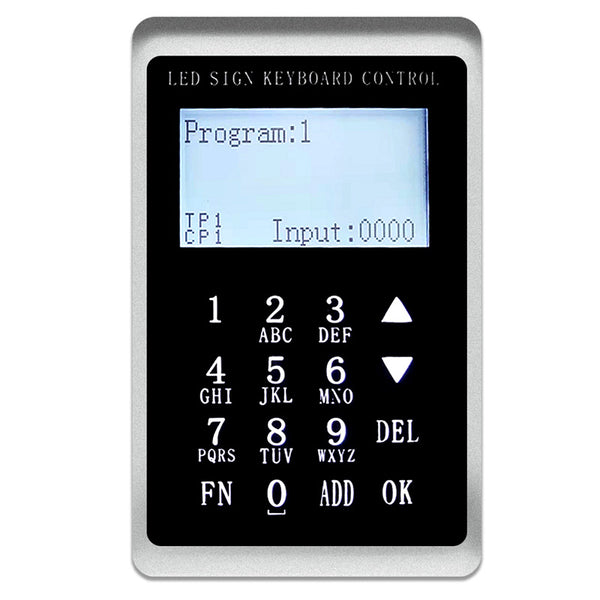
LCD Keypad functions introduction.
1. Directional and numeric keys
2. Brightness setting
3. Power-off saving
4. Language setting
5. Buzzer setting
6. Baud rate setting and synchronization function setting
1. Direction key:
Click UP Switch the program up, and Click DOWN Switch down the program.
Numerical key:
Click 5 + OK Select Play program 5, Click 5+6 + OK, and select Play program 56.
2. Brightness Settings:
Click FN Enter the function Settings interface, Select the brightness setting option, Click OK Go to the Brightness Adjustment page, Click again UP, and DOWN Increase or decrease brightness.
Or click 6 +OK Adjust to Brightness 6. Click FN Return to the previous interface.
3. Switch screen:
Select the Go to Switch Screen option, Click OK Click UP, and DOWN Switch on and off screen options. Click FN Return to the previous interface.
4. Save without power
When the LED sign is turned on and powered back on, the selected program will be maintained.
5. Language Settings:
Support Chinese, English, and traditional three languages, Select the language settings and click OK to enter, Click UP and DOWN to Switch languages, and Click OK to Select the language. Then wait to power up again.
6. Buzzer Settings
There will be a dripping sound every time the button is turned on, and there will be no after it is turned off.
7. Baud rate setting
Switch to the baud rate setting option. Click OK, Click again UP and DOWN Switching baud rate, and lastly click OK.
8. Setting of the synchronization function
Divided into screen capture synchronization and text synchronization, the text program will display the current program, and the screen capture function will intercept the picture to the keypad. (The size cannot exceed 128x64 points and there is no grayscale.)
9. Edit the program sequence function :
Click the number keys 1+ADD +3 +ADD +5 + OK
Program 1, program 3, and program 5 are played in sequence.
Click the number keys 5+ADD +1 + ADD+ 3+ OK
Program 5, program 1, and program 3 are played in sequence.
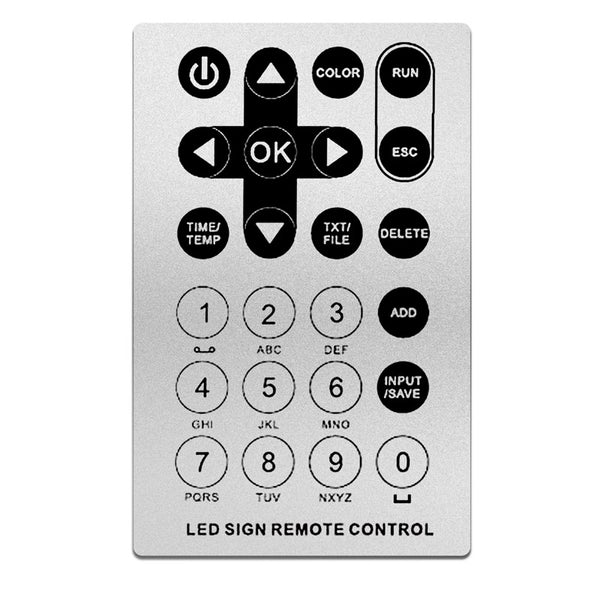
About the Remote Controller for Select Messages to Display.
1.1 Function key
POWER button, Turn ON or Turn OFF
UP and DOWN button, Return or Next program
LEFT and RIGHT buttons, Brightness adjust
【0-9】 Number of program
【ADD】 Add another program
【RUN】 Finish editing and play the program that is selected (Save to RAM)
【ESC】 Exit edit
【SAVE】 Finish editing and play the program that is selected (Save to FLASH)
【DELETE】 Exit edit and cancel select playing
1.2 How to use this remote controller, fast to choose your messages display.
Example 1:Play a program
1.[9]+[RUN] (Play program 9)
2.[04]+[RUN](Play program 4)
3.[12]+[RUN](Play program 12)
Example 2:Play multi-programs
1.[2]+[ADD]+[4]+[ADD]+[03]+[SAVE](playing 2->4->3 program,and save to FLASH)
2.[04]+[ADD]+[5]+[ADD]+[RUN](playing 4->5 program,and save to RAM)
Brand: Leadleds
Usage Environment: Indoor, semi-outdoor, nonwaterproof
Frame Size: 20.3 × 6 inches (517 × 152 × 55mm)
Message Color: 7 colors
Display Ability:Text, number, symbol, animation etc
Light Source Type: LED
Control Method: Apps, Software
Support Languages: Global Languages
Special Features: Display Your Messages
OFF-line display, display your messages don't need to connect to other devices, just power on and play
Fast program your messages, Easy to use
Shipping way: By express
Order handle time: Within 7 business days
Warranty: Lifetime technical support, 1-year parts replacement. After the guarantee term, still support maintenance in all the coming years.
The default power source with AC plug, available 100 -120V or 200-240V depending on where you asking shipping to.
If you want the LED message board for input DC9-36V and with power cable, please send an email with your order number# for this requirement while you place the order.